layout
Provides access to the current outer container's (or page's, if none) dimensions (width and height).
Accepts a function that receives a single parameter, which is a dictionary
with keys width and height, both of type length. The function is
provided context, meaning you don't need to use it in combination with the
context keyword. This is why measure can be called in the example
below.
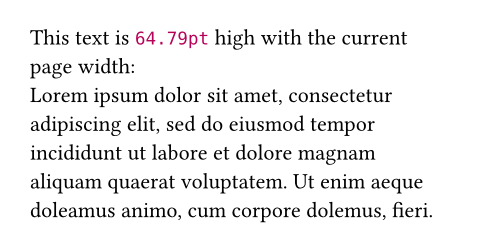
#let text = lorem(30)
#layout(size => [
  #let (height,) = measure(
    block(width: size.width, text),
  )
  This text is #height high with
  the current page width: \
  #text
])
Note that the layout function forces its contents into a block-level
container, so placement relative to the page or pagebreaks are not possible
within it.
If the layout call is placed inside a box with a width of 800pt and a
height of 400pt, then the specified function will be given the argument
(width: 800pt, height: 400pt). If it is placed directly into the page, it
receives the page's dimensions minus its margins. This is mostly useful in
combination with measurement.
You can also use this function to resolve ratio to fixed lengths. This
might come in handy if you're building your own layout abstractions.
#layout(size => {
  let half = 50% * size.width
  [Half a page is #half wide.]
})

Note that the width or height provided by layout will be infinite if the
corresponding page dimension is set to auto.
ParameterParameterParameters are input values for functions. Specify them in parentheses after the function name.
layout()->funcRequiredRequiredRequired parameters must be specified when calling the function.PositionalPositionalPositional parameters can be set by specifying them in order, omitting the parameter name.
funcA function to call with the outer container's size. Its return value is displayed in the document.
The container's size is given as a dictionary with the keys width
and height.
This function is called once for each time the content returned by
layout appears in the document. This makes it possible to generate
content that depends on the dimensions of its container.